 LalabbTools
Square vs Portrait Books: Which Page Shape Fits Your Art?
Place the same art and text on both page shapes, then compare cropping, readable space, supported trim sizes, and print cost.
Try the same illustrations and text on square and portrait pages. Compare the size of the art, remaining white space, and readability before choosing. Then confirm that your printer offers the chosen trim size and estimate its cost.
Who this guide is for
For anyone choosing a book shape that preserves artwork without cropping and leaves enough room for comfortable reading.
Place the same art and text on both shapes
Before choosing a size, pick one nearly square image and one tall image from the book. Add the same title and short description to both square and portrait page mockups. Rather than deciding in advance which is better, compare image size, remaining space, and how comfortably the words read.
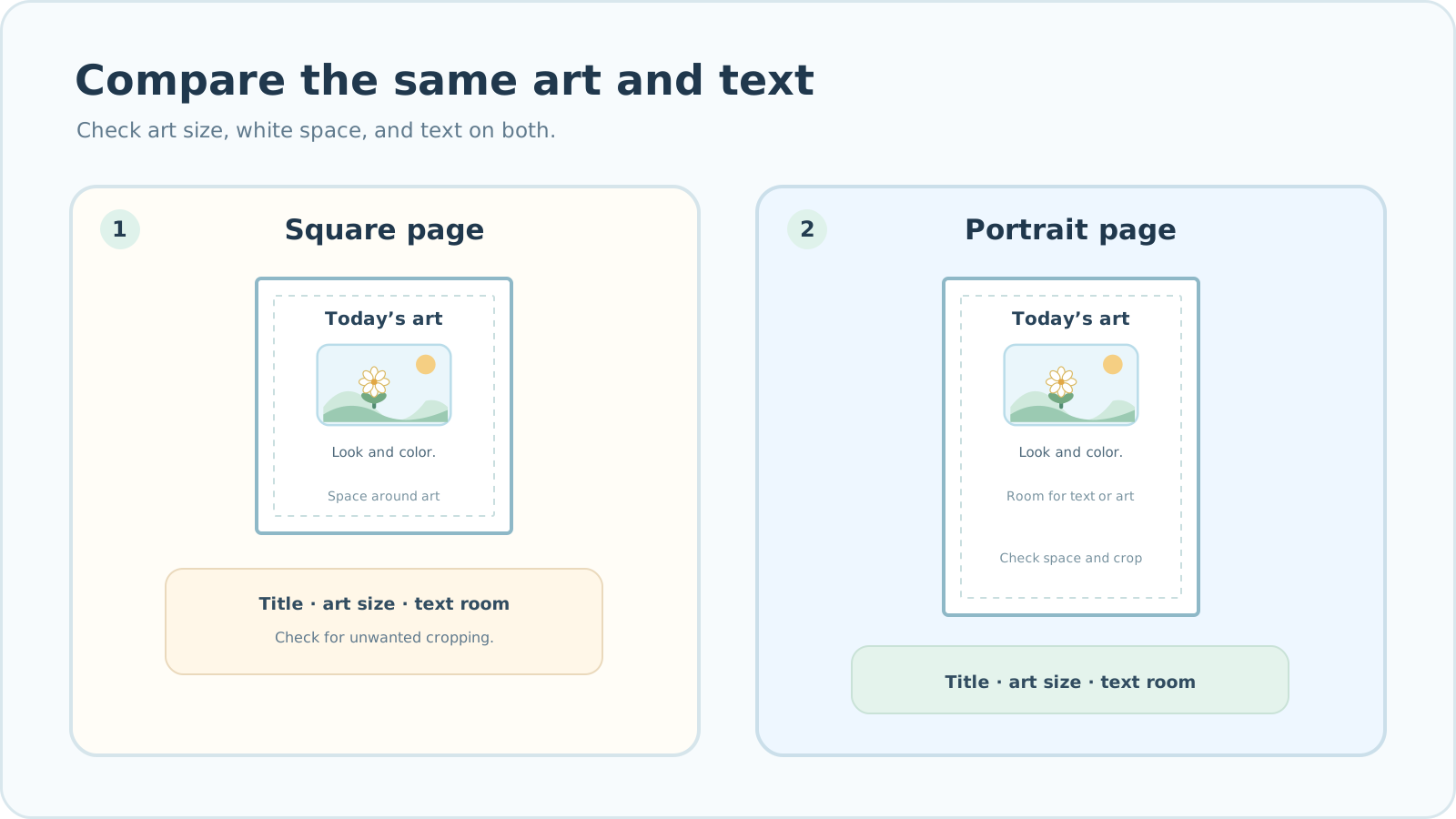

Square and portrait side by side
Publishers call a book’s finished dimensions its trim size. Choose one that works for both your content and the printer’s available options.
| What to compare | What to check |
|---|---|
| Artwork | Square: does the picture become too small or cropped? Portrait: does tall art fit without losing important parts? |
| Text | Square: is there room for the title and a short description? Portrait: do the title and text read comfortably above or below the art? |
| White space | Square: is the space around the picture comfortable? Portrait: is space balanced around both art and text? |
| Multiple pages | Place art in different orientations. Does the image size or remaining space jump too much from page to page? |
| Production | Does the printer offer this trim size, and what will it cost? |
Do not decide from the table alone. Put a few representative pages on both shapes and compare them directly.
How to choose
Use pages that represent the actual art and writing in the book. Before settling on a shape, check the printer’s supported trim sizes and estimated costs.
- Choose representative pages with both artwork and text.
- Arrange the same content in square and portrait layouts.
- Compare picture size, white space, and room for the title and description.
- Choose the shape that avoids unwanted cropping and reads comfortably.
- Verify printer support and estimated cost for that size.
Checklist for comparing sample pages at actual size
A small on-screen preview cannot reliably show whether type is readable or space feels balanced. Compare the same content at the intended paper size.
KDP trim sizes and print options
- Did I choose both a nearly square and a tall illustration?
- Did I place the same title and description on both page shapes?
- Are important parts of the art free from unwanted cropping?
- Is the text comfortable to read at actual size?
- Is the white space reasonably consistent from page to page?
- Does the printer support this combination of trim size, paper, and ink?
- Did I compare final page-count limits and estimated costs under the same conditions?
Common mistakes when choosing a page shape
To check sharpness at the chosen placement, read Image DPI for KDP books
- Choosing from the cover alone: test interior art in different orientations too.
- Checking the printer’s size list only at the end: an unsupported trim size can force a full layout change.
- Stretching art to fill a page: adjust placement and margins instead of distorting the original proportions.
- Changing trim size without checking type size: inspect readability on actual paper again.
- Assuming shape alone determines cost: compare page count, ink, paper, and trim size together.
Answers while choosing
Can I change the book size after laying out pages?
You can select a different size in Book Studio, but the same image may occupy a different area and leave different margins. Recheck every page, not just the sample.
Is a larger book always more expensive?
Not always. Cost depends on the printer, trim size, page count, paper, and print options. Compare quotes for the exact choices you plan to use.
Can one book mix square and portrait page sizes?
A Book Studio project uses one page size for its interior PDF. You can place artwork of different orientations within that size, but not mix square and portrait PDF page dimensions.
Troubleshooting
Text covers the art or becomes too small on a square page.
Give the title and description their own space instead of forcing them beside the art. If the result is still hard to read, compare the same content on a portrait page.
Mixed tall and wide art makes page sizes look inconsistent.
Place a representative drawing from each orientation inside the same trim size. Aim for a shape where both feel natural rather than making every picture fill the page.
Images look blurry after I change book size.
Check whether the artwork now occupies a larger area. Compare the original pixels with that new placed size. Use a larger source or place the art smaller if needed.
The printer does not offer the book size I chose.
Check the current trim list and the available paper and ink combination. Put the sample pages into the closest supported option and compare cropping and text size again.
The cover and interior have different trim sizes.
Use the final interior PDF trim size to check the project settings. Prepare a new cover PDF with that same trim size and final page count, then compare it with the printer’s template.
What Lalabb can do—and what you need to decide
Book Studio lets you select a book size and arrange pages. You still need to judge which shape suits your content, whether your printer offers it, and what production will cost. Lalabb cannot guarantee that a specific trim size can be printed or that a publisher will approve the book.
Frequently asked questions
Is a square book always best for certain types of artwork?
No single art type guarantees a better shape. Place square, tall, and wide examples on the candidate pages and compare cropping and white space.
Can I put a wide image in a portrait book?
Yes. It may appear smaller or leave space above and below. Check the balance of art and text on a representative page.
Can a single book contain art in different orientations?
Yes, but Book Studio uses one page size per project. Decide how each orientation will fit within that common size.
Do I need to make the cover before choosing the book shape?
Usually it is safer to test interior pages and supported trim sizes first. Once interior size and final page count are known, prepare the cover using the same settings.
Will a smaller book automatically improve image DPI?
Placing the same pixels in a smaller space can increase effective DPI. It does not create missing source detail. Check both readability and sharpness at the new size.
Is it okay for different illustrations to have different margins?
It can be an intentional choice. Review several pages in sequence so image sizes do not change jarringly, and keep important details away from unintended cropping.
If KDP offers a size, will another printer offer it too?
No. Printers differ in trim sizes and paper and binding options. Check the printer you will actually use and retest sample pages to its current specifications.
Must I change the book shape if the page count changes?
Not necessarily, but recheck the supported page-count range, cost, and cover spine width using the final interior PDF count.
Which costs less, a square book or a portrait book?
Shape alone cannot tell you. Compare actual quotes or calculators using the printer, trim size, final page count, paper, and ink you plan to use.
Try it now
Book-making flow
- Create content
- Prepare files
- Gather pages
- Book Studio
- Cover Studio
- Final check
Choose the book’s trim size and shape based on the art and text.
Gather pages, check the interior PDF and final page count in Book Studio, then prepare the cover in Cover Studio.